WP PAYMENTS PRO  ·   BY WOLF DESIGNS*

Everything your premium content business needs. One plugin. Zero coding.

WP Payments Pro is a self-contained WordPress suite for memberships, payments and donations — with Stripe, PayPal, bank transfer and cash, a visual drag-and-drop page builder, page protection, ten email templates and a polished member dashboard.

No theme dependencies. No page-builder conflicts. No coding required.

Any WordPress theme · Four payment methods · Non-coder friendly · Actively maintained

Features  ·  How it works  ·  Who it’s for  ·  Pricing  ·  FAQ

Your membership setup shouldn’t cost you sales

If the checkout breaks, the pages look generic, or a paying member cannot get in, you’re left doing support work instead of running your business.

Updates shouldn’t break checkout

Theme changes, plugin conflicts and WordPress updates can put payments or protected content at risk. A self-contained suite keeps the essential membership tools together.

Your money pages should feel premium

Checkout, pricing and donation pages are central to the customer experience. Build and style them yourself rather than being stuck with generic forms.

Members need a way back in

When a customer pays with one email and registers with another, self-service membership claiming can resolve the mismatch without a support ticket.

One standalone suite. Ten connected modules.

WP Payments Pro brings membership management, payments, donations, page design and member access into one Wolf Designs package — without depending on your theme or a separate page-builder plugin.

A complete membership business toolkit

The working parts are designed to connect — from the first checkout to a member’s next renewal.

1. Membership engine

  • Create custom tiers with your own names, prices, billing periods, durations and rich-text benefits.
  • Track members in a ledger with contact details, tier, status, start and expiry dates, join source and notes.
  • Use four clear statuses: Active, Pending, Expired and Cancelled.
  • Consecutive renewals of the same active tier extend from the current expiry date, preserving remaining membership time.
  • Daily auto-expiry can update lapsed members, send an expiry email and alert the admin.
  • Configurable renewal reminders at 30, 7 and 1 days before expiry use editable templates.

2. Hybrid payments

  • Stripe hosted checkout and PayPal checkout with webhook-based payment confirmation.
  • Bank transfers and cash can be entered into an approval queue for manual verification.
  • Configure gateway instructions, supported payment methods and approval behaviour.
  • Live duplicate-subscription checks can identify an active membership as a customer types and offer a Continue & Extend option.
  • Each payment creates an auditable pending or completed record with gateway, customer notes and date/time.
  • Approve, reject with a reason, or use webhooks to auto-approve supported gateways.
  • A webhook health checker helps identify when a password gate or maintenance mode could block confirmations.

3. Donations, tracked separately

  • Add a standalone donation form by shortcode or builder block, with your own title and suggested amount.
  • Let supporters choose an amount from $1 to $5,000; the total updates live and is validated on the server.
  • Record donations as donations, separate from membership tiers and member status.
  • Offer an optional donation top-up on membership checkout.

4. Claim Your Membership

If a customer pays with a different email from the one on their WordPress account, they can link the accounts themselves:

  • They enter the payment email and receive a one-time six-digit code at that address.
  • The code expires after 10 minutes, allows five attempts and has a 60-second cooldown.
  • After verification, the account is linked and protected pages unlock for that member.
  • The admin receives an email showing the payment email, tier and linked account.

Admins can also link an unlinked member to a site user from the Members list.

5. Page protection

  • Restrict WordPress pages to selected membership tiers from the page editor.
  • See public and restricted pages in the Pages list; use Quick Edit and Bulk Edit for faster changes.
  • Test a lock on one page or globally, with an admin bypass option.
  • Customise the Access Restricted message, renew button and URL, login button text and dashboard destination.

6. Visual page builder

  • Build checkout, pricing and donation pages with heading, rich text, image, button, spacer, payment-form and donation-form blocks.
  • Start from a secure checkout landing page or three-column comparison pricing template.
  • Adjust fonts, colours, Wolf Designs swatches, borders, radius, margins and padding in the live canvas.
  • Drag, reorder, duplicate and delete blocks; publish the result as a WordPress page.
  • Checkout blocks can fall back to a valid tier if a tier used on a page is later removed.

7. Ten-template email engine

  • Edit ten email templates in a WordPress rich-text editor.
  • Use merge tags including name, tier, expiry date, renewal URL, site name, site URL and donation.
  • Cover welcome, renewal reminders, expiry, payment pending/completed/rejected/cancelled, bank transfer, cash and claim-code events.
  • Choose independently whether members or admins receive each notification.
  • Send standard HTML emails through wp_mail(), compatible with your SMTP plugin.

8. Member dashboard

  • Show a membership-term progress ring, tier, status and plan benefits.
  • Display transaction history with amounts and dates.
  • Allow members to edit their name and phone, and provide Renew Now and Make a Donation buttons.
  • Toggle dashboard sections from settings; show Claim Your Membership when an account is not yet linked.

9. Admin suite

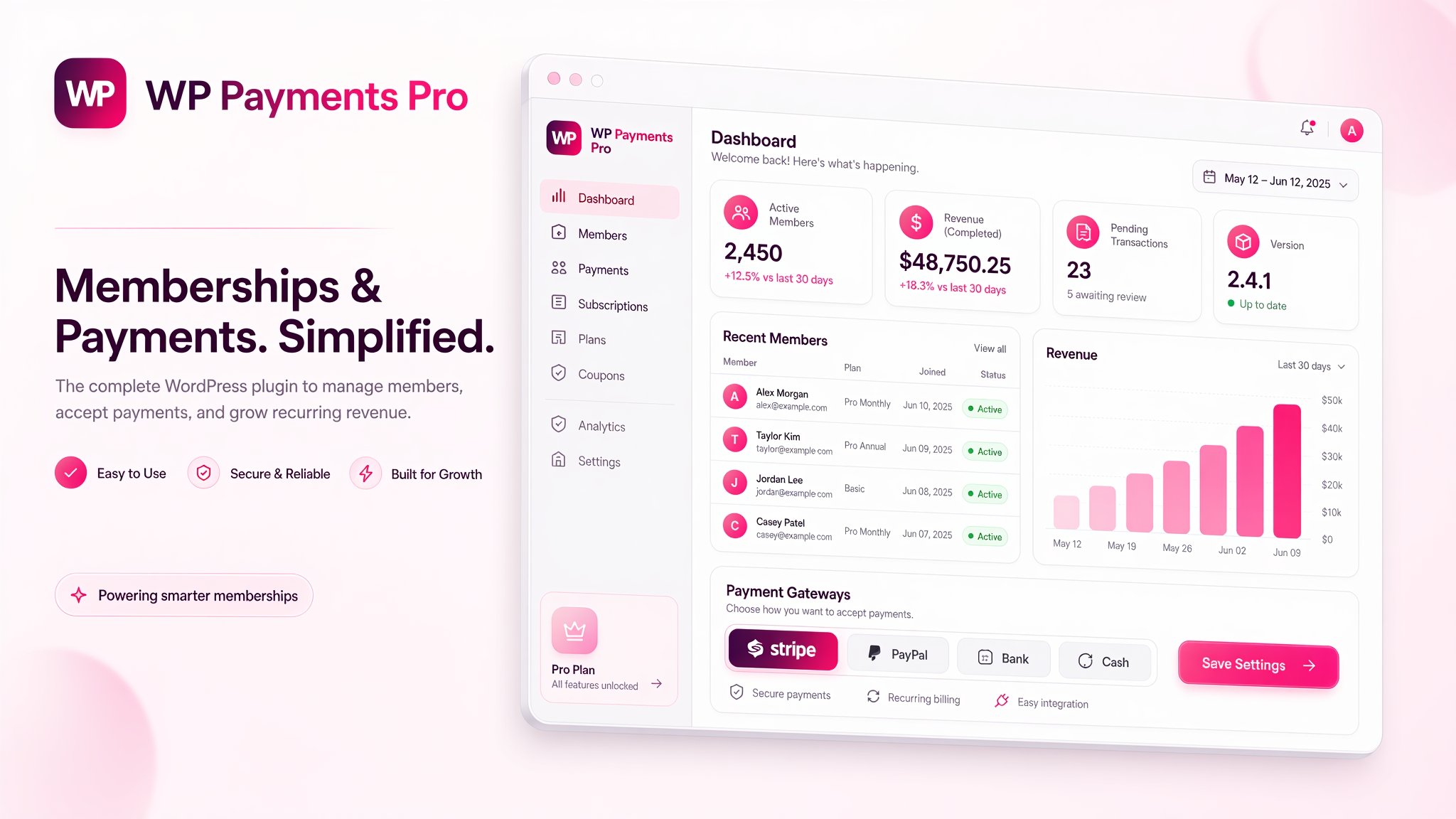
  • Dashboard tiles for currency, member totals, active members, completed revenue, pending transactions, gateways and version.
  • View a live 12-month revenue chart and transaction history.
  • Manage members, edit or extend memberships, cancel or delete records, and copy email addresses.
  • Review and approve payment transfers; import member records from CSV.
  • Search the Security Activity Log, including actor and IP details.

10. Native WordPress integration

  • Add membership status and tier information to the WordPress Users list, including a “Paid with” note when payment and login emails differ.
  • Show access restrictions in the Pages list with Quick Edit and Bulk Edit.
  • Use standard WordPress authentication without creating users or changing roles.
  • Wolf Designs branding appears in the Plugins page, with current version information.

From visitor to paid member in four steps

1. Visitor

Arrives at your Visual Builder landing page — checkout, pricing or donations.

2. Checkout

Completes a short form, chooses a gateway and sees an active-member check before paying.

3. Payment

Pays by card, PayPal, bank transfer or cash. Pending records enter the approval flow; supported webhooks can confirm payments automatically.

4. Member

Membership activates after the configured approval, welcome email is sent and the member is directed to their dashboard.

Get started in three steps

Install and activate

Upload wp-payments-pro.zip under Plugins → Add New → Upload Plugin. The supplied requirements are WordPress 6.0+ and PHP 7.4+.

Connect your gateways

Add your Stripe keys or PayPal business email, then enable the payment methods you plan to use.

Build, protect and publish

Create your checkout page in the builder, lock premium pages to tiers and begin taking payments.

Built to be trusted

  • AES-256 encrypted storage for Stripe and PayPal credentials; stored credentials are not plain text.
  • Nonce checks on admin actions and forms, with prepared database queries.
  • Server-side validation, including donation amounts capped from $1 to $5,000.
  • An Activity Log records key actions, the actor and IP address.
  • Standard WordPress authentication; the plugin does not create users or assign roles.

Designed for WordPress

Built around WordPress authentication, six indexed custom tables and a settings option. The product spec says the plugin bootstraps early to avoid just-in-time text-domain warnings and is tested with WordPress 7.x branding changes.

For production email delivery, connect an SMTP plugin or service of your choice.

Is WP Payments Pro right for you?

Good fit if you…

  • Sell premium content, courses, directories, community access or subscriptions on WordPress.
  • Want Stripe, PayPal, bank transfer and cash in one membership suite.
  • Prefer visual setup to writing code or stacking multiple plugins.
  • Take donations alongside memberships and want them tracked separately.
  • Value a product designed to work independently of your theme.

Not the right fit if you…

  • Need cards to be charged automatically on a recurring schedule. Renewals use reminders and member repurchase.
  • Require multi-currency or a complex e-commerce cart.
  • Need a plugin that replaces a full firewall or malware scanner.
  • Want automatic email delivery without configuring an SMTP provider.

What’s in the box

The plugin, user guide and supporting materials described for WP Payments Pro v2.2.6.

  • Included item
  • wp-payments-pro.zip
  • Admin User Guide
  • Ongoing maintenance
  • What you get
  • The complete installable plugin
  • Setup, workflows and an 11-topic FAQ vault bundled inside the plugin
  • Every versioned release ships with a changelog, refreshed documentation and a fresh verified backup

A living product, actively maintained

Version 2.2.6 brings customer-chosen donation amounts, live total updates, server-side amount limits and cleaner separation between donations and memberships.

Recent releases

  • v2.2.6: self-selected donations from $1–$5,000, live price updates and server-side amount limits.
  • v2.2.5: donation forms separated from membership checkout, with editable donation title and default amount.
  • v2.2.4: gateway labels and editable payment source records.
  • v2.2.2–2.2.3: clearer Stripe and PayPal approval labels and admin alerts.
  • v2.2.0–2.2.1: Claim Your Membership and the admin Link-to-User tool.

Release-by-release maintenance

According to the product specification, releases include a changelog, refreshed documentation and a verified restorable source backup.

Choose your license

Personal · 1 site · AUD$147 per year

Annual license with updates and support included.

After 1 year plugin continues without updates and support unless renewed.

What every license is built around

  • Memberships, payments and donations in one plugin
  • Stripe, PayPal, bank transfer and cash
  • Visual page builder and page protection
  • Member dashboard and email templates
  • WordPress 6.0+ · PHP 7.4+

What users are saying

Replace these marked slots with genuine customer feedback before publishing. No testimonial copy has been invented.

The creator who was stuck with clunky tools

“I’d bounced off three membership plugins before finding WP Payments Pro. They all looked like database dumps and broke every time I updated my theme. This one just… works, and it looks like my brand out of the box. I built my entire checkout page with the built-in builder in about an hour — no developer, no page-builder plugin, no code.”
— a course/content creator, 1-site owner

 “I paid but I’m locked out” tickets

“The claim feature alone paid for the license. Customers who pay with a PayPal email but register with a work email used to end up locked out and furious. Now they fix it themselves in two minutes, and I get an alert email the moment it happens. Our support inbox actually went quiet.”
— a community/directory site owner

The operator who needed mixed payment methods

“We take cards, PayPal, bank transfers and even cash at events — in ONE system. The approval queue is the killer feature: every payment sits there labelled by gateway with the customer’s notes, I approve it, and the membership activates with the right emails automatically. And donations finally stop polluting our member list.”
— an events/membership business running offline payments

Frequently asked questions

Do I need to know how to code?

No. Tiers, gateways, page locks, emails and builder pages are configured in the WordPress admin.

Will it work with my theme?

The plugin is designed to be self-contained and theme-independent, with its own admin styling and frontend forms.

Which WordPress and PHP versions are supported?

WordPress 6.0+ and PHP 7.4+. The product spec reports testing through WordPress 7.1+, with the branding layer designed for 7.2+.

How do payments work?

Stripe and PayPal use hosted checkout and webhooks. Bank transfers and cash enter an approval queue; you verify funds, approve the transaction and the membership activates. Payment records are logged.

What if the payment email differs from the account email?

Use Claim Your Membership: the customer verifies access to the payment email with a one-time six-digit code, then links the account. Admins can also link the user from the Members list.

Can customers donate and choose the amount?

Yes. A separate donation form accepts a customer-entered amount from $1 to $5,000 and keeps donation records separate from memberships.

How do renewals work?

Configurable reminders can go out 30, 7 and 1 days before expiry. Members renew by repurchasing; consecutive renewals extend from the existing expiry. Expiry is processed automatically.

Do I need an SMTP plugin?

For production email delivery, yes. WP Payments Pro sends standard wp_mail() HTML emails and can work with your SMTP plugin of choice.

What if my site is behind a password gate or maintenance mode?

Payment webhooks need public access. The webhook health checker can indicate whether confirmations may be blocked.

Does it create WordPress users or change roles?

No. It uses standard WordPress login and its own member ledger; it does not create users or assign roles.

What if I delete a tier used by a landing page?

The product spec says checkout blocks can fall back to a valid tier, while the builder, dashboard and locks degrade gracefully.

Can I migrate my data?

There is a CSV member importer. The product data is stored in indexed custom tables and a settings option; an optional uninstall setting controls data deletion.

Are automatic recurring card charges included?

No. Renewals use reminders and member repurchase rather than cards being charged automatically on a schedule.

Run your premium portal on your own terms

Memberships, payments, donations, protected content and a member dashboard — designed to work together in WordPress.

Questions? [ADD APPROVED CONTACT / SUPPORT LINK BEFORE LAUNCH]

© 2010-2018, Quick Link Designs.