Stop junk mail before it reaches you.

Wolf Mail Shield shows you what is waiting on your mail server — and lets you delete it, bounce it, or block the sender, right there. The junk never reaches your inbox.

Windows 10/11  ·  No subscription  ·  No dependencies
See how it works ↓

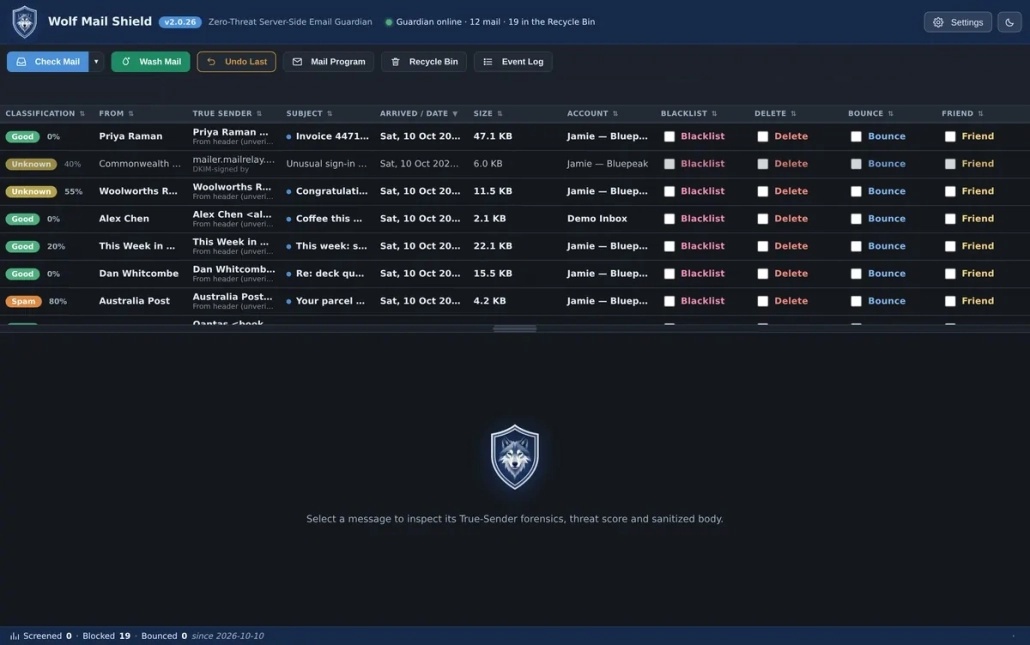
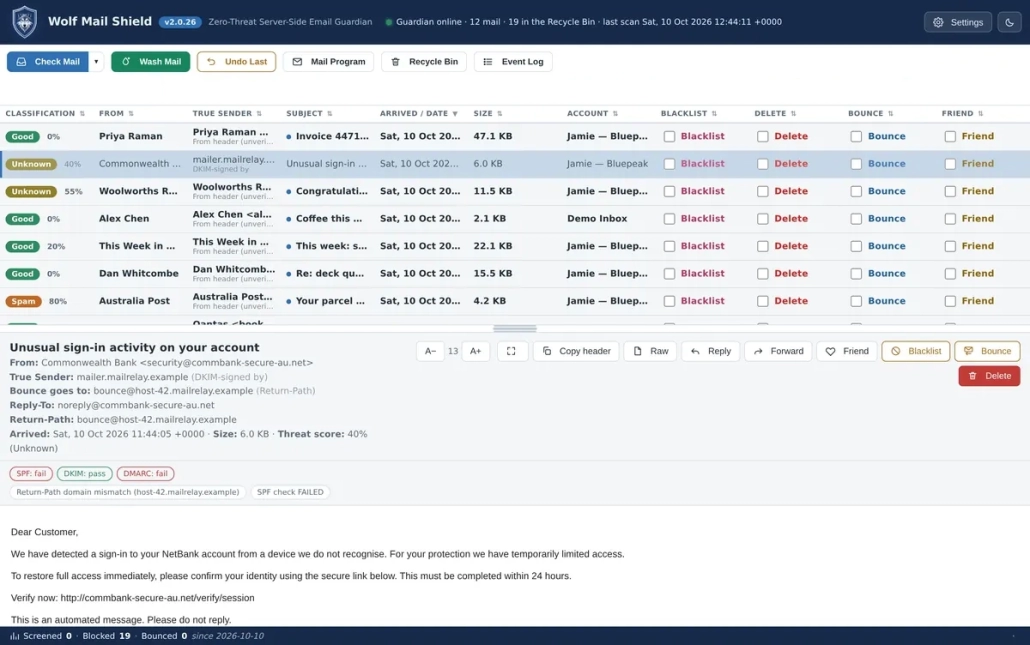
The inbox. Everything waiting on the server, with the four action columns down the right.

The problem

Your inbox is not really yours any more.

Every day it fills with things you did not ask for: offers, scams, newsletters you forgot signing up for, and messages pretending to be from your bank. Your mail program’s filters catch some of it. The rest sits there, waiting for you to deal with it manually — and that is exactly the work you did not want to do.

There is a better place to deal with it — before it gets here.

Deleting junk after it arrives still means it arrived. It took your attention. It took your time.

Wolf Mail Shield lets you inspect and handle unwanted messages while they are still waiting on the mail server.

How it works

Three steps. Not a project.

1. Check Mail

Wolf Mail Shield collects the headers of everything waiting for you — without downloading the messages.

2. Decide

See who it is really from and why it looks suspicious. Tick Blacklist, Delete, Bounce or Friend.

3. Wash

It happens on the server. The junk is gone before your mail program ever sees it.

Your mail program then downloads only what you actually wanted.

Why the server is the right place to deal with junk

Every message you receive sits on a mail server first, and stays there until your mail program fetches it. That gap is the only point at which you can deal with junk before it reaches you. Nothing forces you to download a message to find out what it is: the headers — sender, true sender, subject, date, size and the authentication results — are readable on the server, and that is enough to decide in almost every case.

The alternatives are weaker. Webmail technically works, but means a separate login per account and no way to see all your mailboxes together. Provider-side rules filter automatically but cannot ask you to decide message by message. A pre-inbox filter is the practical answer.

The four actions

One tick per message. Four ways to deal with it.

Blacklist

Blocks the sender permanently.

Delete

Removes the message from the server.

Bounce

Sends a real delivery-failure report.

Friend

Adds the sender to your whitelist.

Why Bounce is the one that matters

Deleting tells a spammer nothing.

Your address still looks live, so the mail keeps coming. Bounce sends a real “address does not exist” reply. To a spammer, a dead address is worthless. Mailing lists that bounce you get cleaned up, because sending to dead addresses hurts their reputation. It is the difference between ignoring a knock at the door and taking your name off the list.

The economics are the point. Sending mail costs senders reputation, and mail sent to addresses that do not exist damages it. Lists that care about deliverability prune bounced addresses automatically.

When to use which

Bulk spam from a stranger Bounce — marks you dead, so the volume drops
Newsletter you no longer want Bounce — gets you removed properly
Suspicious mail you may want later Delete — quiet, and it lands in the Recycle Bin
A sender who must never return Blacklist — handled automatically from then on

One important caution

Never bounce mail from your own address.

Spammers routinely forge the victim’s own address into the From line. Bouncing that sends the failure report straight back to you — and confirms the address is live, which is the opposite of the goal.

Wolf Mail Shield refuses to do it. It checks every bounce target against your own addresses and will not send one to you. That is enforced in the code, not left to you to remember.

True Sender

See who it is really from.

A phishing message can say it is from your bank, your accountant, or your own address. The From line is just text the sender typed — email was designed in an era of trust, and the visible From header carries no guarantee at all.

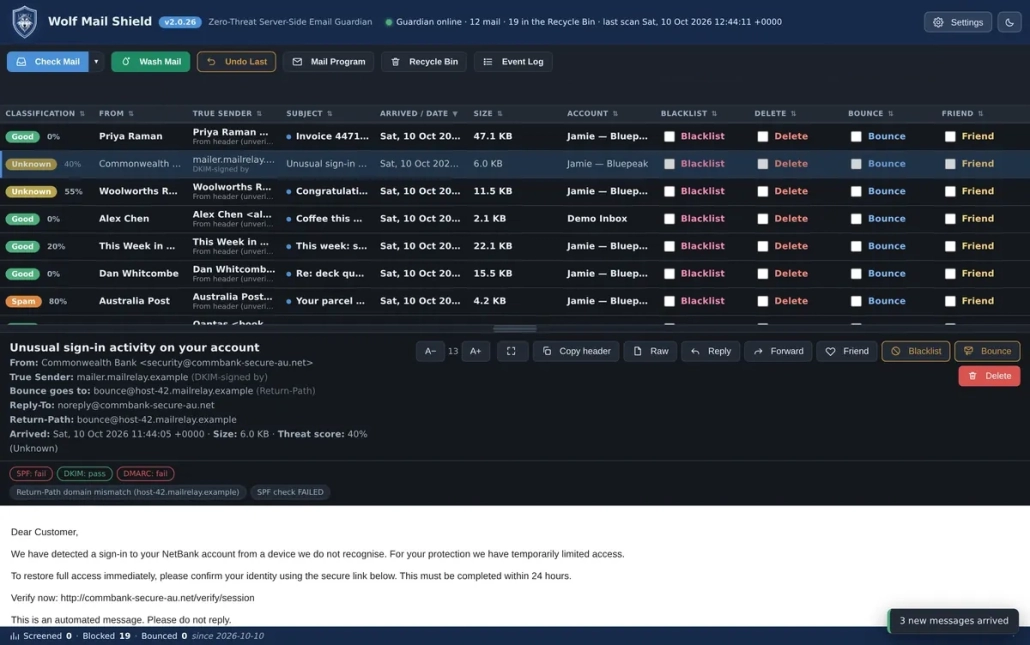
Wolf Mail Shield shows you the True Sender: the address the message actually came from. When “From” says your bank and True Sender says a server in another country, you know in a second.

The order of evidence

Real identity comes from the authentication recorded as the message travelled — SPF (was this server allowed to send for that domain?), DKIM (was it cryptographically signed, and by whom?) and DMARC (does the domain’s policy say it should pass?). Wolf Mail Shield answers “who sent this?” using the strongest evidence available:

  • The DKIM signing domain — cryptographic proof of who signed it.
  • The SPF-verified envelope sender — the return path it actually travelled under.
  • The connecting IP — which machine handed it over.
  • The From header — only if nothing better exists, and labelled as unverified.

Critically, a From address matching your own is treated as proof of forgery, not identity. Nobody emails themselves. The envelope sender is used instead, so a spammer cannot make the tool accuse you of sending their mail.


A message claiming to be from a bank. True Sender names the mailer that actually signed it.

Previewing on the server is safer

What the headers tell you

Who sent it, how it was authenticated, what it claims to be, and the attachment names — so you can see invoice.exe before it is on your disk.

Why it is safer

Mail programs load remote images, which tells the sender your address is live and gives them your IP. On the server, nothing renders, no remote content is fetched, and no attachment touches your disk.

If you do want to read the body, Wolf Mail Shield fetches it on demand and shows it as plain text — it does not load remote images or scripts. The raw source is always available, including the full Authentication-Results header.

Everything it does

Full capability, at a glance.

Triage

  • Server-side preview — read headers without downloading a thing
  • True Sender — see through spoofed senders
  • Classification reasons — ask why, and check the verdict
  • Unread tracking — new mail shows bold
  • Preview / raw source — inspect the whole message first
  • Forensics — SPF, DKIM, DMARC and originating IP

Actions

  • Blacklist — block a sender for good
  • Delete — remove it from the server
  • Bounce — send a real delivery-failure report
  • Friend — whitelist a sender
  • Rules — automate the decisions you keep making
  • Recycle Bin — mistakes stay recoverable

Safety

  • Runs locally — nothing is uploaded anywhere
  • Encrypted credentials — stored on your own machine
  • Recycle Bin first — a misclick is a restore, not a disaster
  • Ask before washing — nothing is destroyed until you press Wash

Living with it

  • Multi-account — all your mailboxes in one place
  • New-mail alert — the tray wolf flashes until you click it
  • Dark and light themes — comfortable any time of day
  • 18 sounds — a real recorded wolf howl, plus 17 alternatives
  • Adjustable text size — the mail list fits how you read
  • Starts with Windows — quietly, in the tray

Screenshots

Take a look inside.

Select any screenshot to open the full-size image in Enfold’s lightbox.

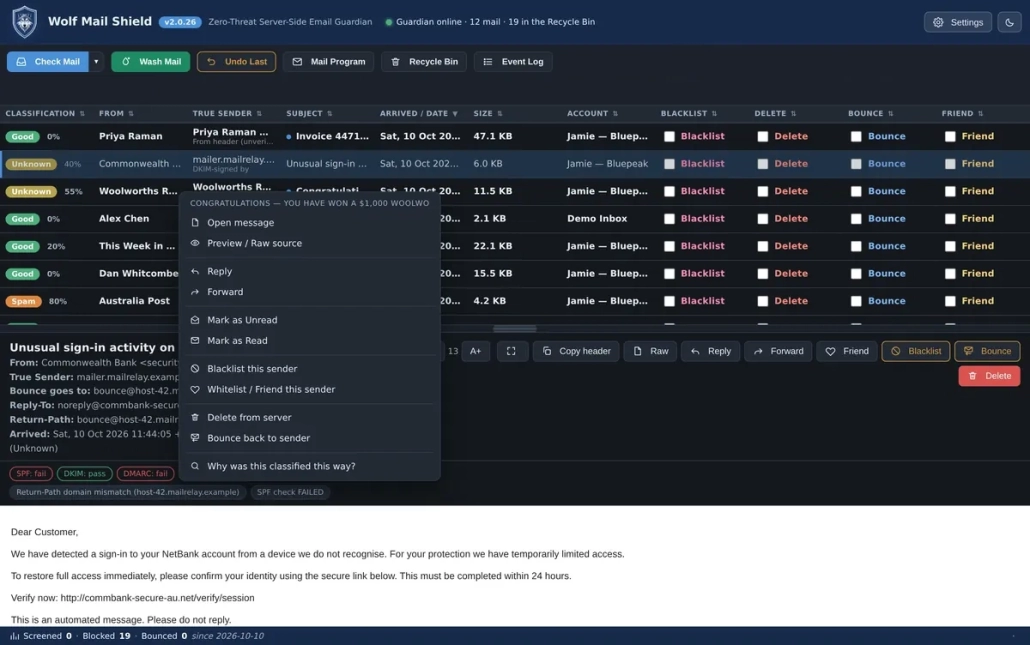
Right-click any message for the full set of actions.

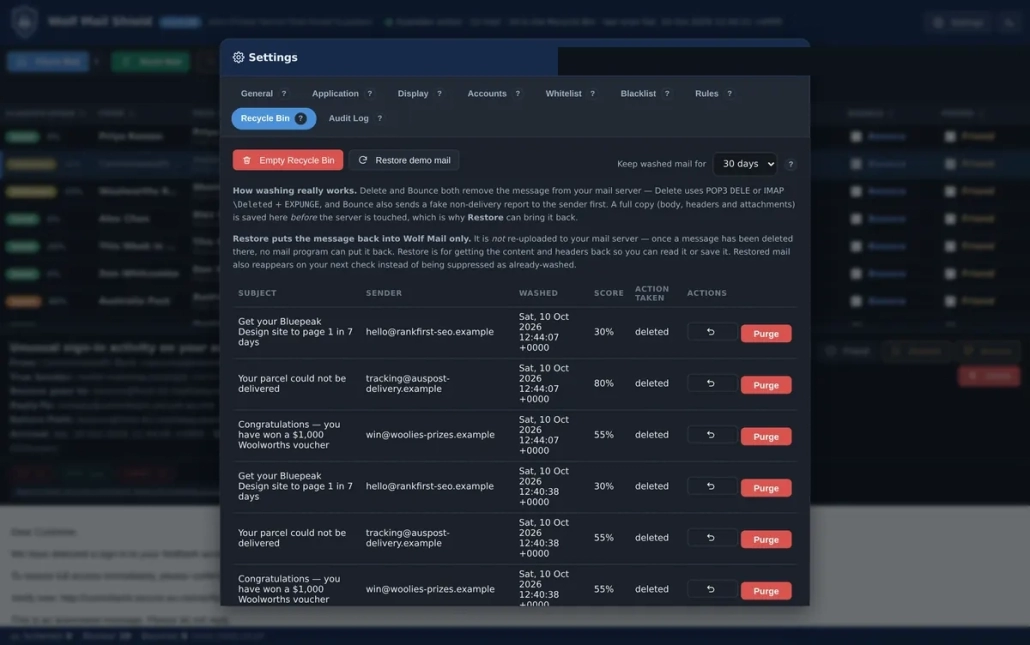
The Recycle Bin. Deleted mail stays recoverable.

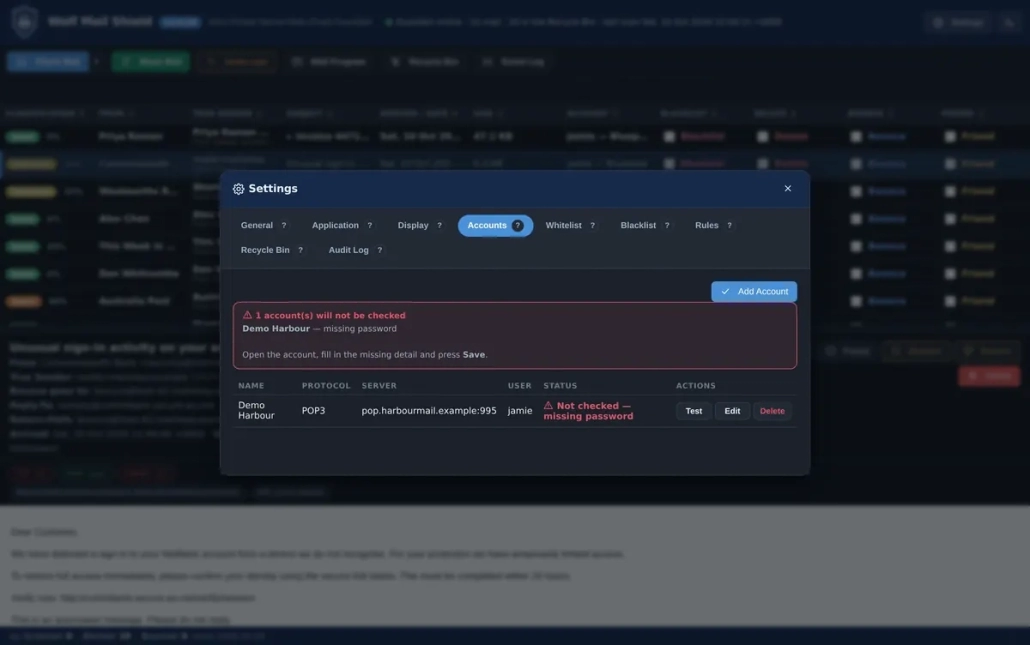
Settings → Accounts, with a Test button so you know it connects.

New mail arrives, and you are told.

Light theme, for daylight.

Security and privacy

Your mail stays yours.

Runs entirely on your computer

Mail is fetched, examined and acted on locally. There is no service in the middle, because there is no service.

Credentials are encrypted

Your account details are stored encrypted, on your own machine. They are never sent to us, because there is nowhere to send them.

Nothing is uploaded

The only outbound message Wolf Mail Shield ever sends is a non-delivery report — and only when you choose Bounce.

For the technically minded: the local interface listens on 127.0.0.1 only. It is not reachable from your network, let alone the internet.

Requirements

What you need.

Operating system Windows 10 or Windows 11 (64-bit)
Disk space About 200 MB
Dependencies None — no .NET Framework, no runtimes, nothing to install first
Mail protocols POP3 or IMAP; SMTP for Bounce
Ports 995 / 993 incoming, 465 / 587 outgoing

Built for Windows specifically

Starts with Windows

Launches quietly into the system tray, so it is working before you open your mail.

Tray alerts

The wolf icon flashes when new mail arrives and clears once you have looked at it.

Pin it

A proper taskbar pin with a stable app identity, so it stays put across upgrades.

One honest note about installing

Windows may show a warning because the installer is not signed with a commercial certificate. That warning is about reputation scoring based on signing — it means “I cannot verify who published this”, not “this is malicious”. Windows has not scanned the file and found something wrong.

Every shortcut the installer creates points at the embedded Python interpreter, which carries the Python Software Foundation’s own signature, so Smart App Control is satisfied. Full detail, including what to do if your machine is in Enforce mode, is in the Administrator Install Guide.

Pricing

Pay once. Own it.

One-time price

AUD$79

One time. No subscription. No renewal. No annual fee, ever.

  • The full application — every feature, no cut-down tier
  • All accounts — one mailbox or ten, the price is the same
  • Free updates — every release in the 2.x line
  • Licence is per user, for personal or business use on your own machines.

Compared with a subscription

One payment, or a bill that never stops.

Subscriptions in this category are billed every year, forever. Comparing a one-time price against a single year measures the wrong thing — what matters is what each costs over the time you actually use an email filter, which for most people is years.

Over… A subscription Wolf Mail Shield
1 year One year’s fee AUD$79
3 years Three years’ fees AUD$79
5 years Five years’ fees AUD$79

You also get every feature at one price rather than in tiers, no dependencies to install first, local-only operation, and any POP3 or IMAP provider at no extra cost per account.

FAQ

Questions, answered.

If your provider offers POP3 or IMAP access — which is effectively all of them, including Gmail, Outlook.com, Yahoo and most business hosting — then yes. You add the account by entering the same server details your mail program uses.

No. Wolf Mail Shield runs entirely on your computer. Your account details are stored encrypted on your own machine. Nothing is sent anywhere except when you choose Bounce, which sends a non-delivery report to the sender — exactly as intended.

Deleted mail goes to the Recycle Bin first, not into oblivion. You can preview any message — including its raw source — before deciding, and ask “Why was this classified this way?” Nothing is destroyed until you press Wash Mail, and even then you can restore it.

No — and you would not want it to. Your mail program filters after the mail arrives; Wolf Mail Shield works before it does, on the server. They are complementary: theirs filters your inbox, ours stops the junk reaching it at all. Keep both.

No. Wolf Mail Shield is self-contained — no .NET Framework, no runtimes, no dependencies. Everything it needs is inside the installer.

Yes, and there is no per-account charge. All your mailboxes are handled from one window, and Check Mail can run across all of them at once.

Wolf Mail Shield sends a genuine delivery-failure report to the sender, saying the address does not exist, then removes the message from the server. To a spammer your address now looks dead, and dead addresses get removed from mailing lists — because sending to them hurts the sender’s own reputation.

Because it is not signed with a certificate from a commercial authority. Windows is telling you it cannot verify the publisher, not that it found anything wrong. The shortcuts it installs point at the embedded Python interpreter, which carries the Python Software Foundation’s signature. See the Administrator Install Guide for the full explanation and what to do in Enforce mode.

Yes — 30 days, no conditions. There is also a 14-day free trial that needs no card at all, so you can decide before you pay anything.

Wolf Mail Shield · by Wolf Designs

Decide what arrives.

Contact us to ask a question. See what is waiting on your server — and decide for yourself.

No card required · Windows 10/11

© 2010-2018, Quick Link Designs.